Upload Manager
One row per upload. Statuses advance automatically wherever they can - you step in for approval decisions, for held uploads, and for recovery when something fails.
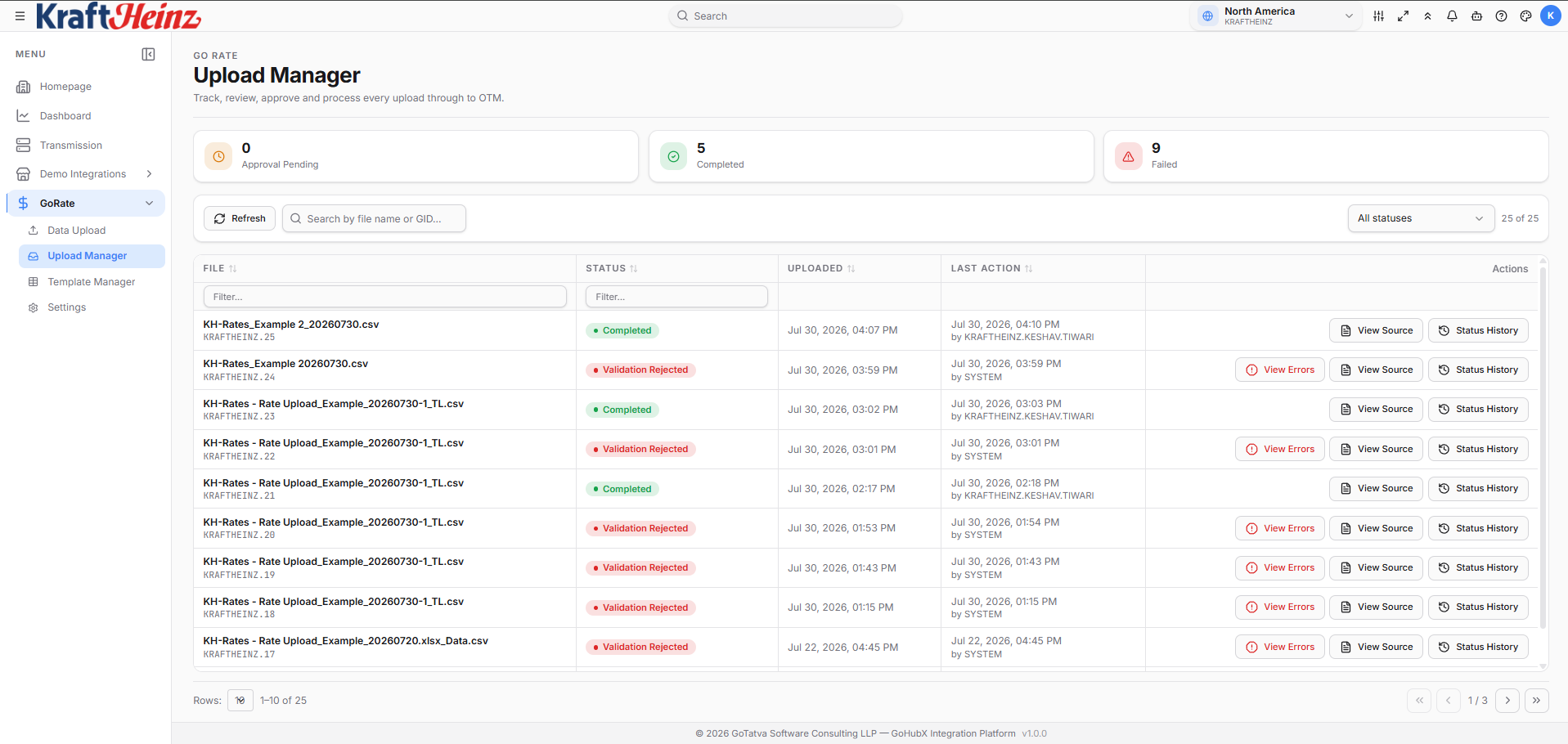
Live counters on top, one row per upload with status and actions.
What's on the page
Live counters run across the top. Below them you can Refresh, search by file name or GID, and filter by status.
Each row shows:
- the file name and its GID (e.g.
KRAFTHEINZ.117) - the current status - see Statuses
- uploaded time, and last action with who performed it
- the actions that apply to it right now
Row actions
Buttons appear only when they apply to the row's status and to you.
| Action | When you see it | What it does |
|---|---|---|
| View Source | Always | The file as uploaded, with rows flagged by validation, and the edit history. Revalidate, Reprocess and the approver's I've reviewed box live here. See View Source |
| Status Tracker | Always | Where the upload is right now, phase by phase, down to each OTM batch. See below |
| View Errors | Validation Rejected or Failed | The validation report, or the failure reason |
| N Rejected | Completed, with records OTM refused | The records OTM rejected and why |
| N Warnings / View Result | Validated or later | Findings from a validation that passed |
| Approve / Reject | Validated - configured approvers only | See Approvals |
| View Comments | Approval Rejected or Cancelled | The approver's comment, or the reason it was cancelled |
| Cancel | The uploader, before loading starts | Withdraws the upload. A reason is required |
| Execute Now / Cancel | Staged | Run a held upload straight away, or drop it |
Report an Incident in the toolbar raises a support incident for the one row you have selected, with the file and its findings attached if you choose.
Status Tracker
Answers the question people actually ask: where is my file, and what is it waiting on? It shows five phases, each marked done, in progress, ahead, stopped or skipped:
| Phase | What you see under it |
|---|---|
| Prepare | Queued, building canonical, and the record count once it is generated |
| Validate | Checking against OTM, then Passed (with any skipped count) or Rejected |
| Approval | Who it is waiting for, who approved or rejected - or Skipped when the template has no approvers |
| Load into OTM | Held for business hours, queued, then one line per OTM table: batch x of y, records loaded, records rejected |
| Finished | Completed, Failed or Cancelled |
Failed batches are named
If a batch does not load, the tracker says which one and why, directly under its table:
RATE_GEO            batch 12 of 12 - 22,000 loaded - 2,000 rejected
  Failed batch      Batch 7 of RATE_GEO (2000 records) was not accepted by the integration after 3 attempt(s): ...
Up to five failed batches are listed per table; any more are summarised as N more failed and listed in the completion email. The rest of the file still loads - one bad batch does not stop the run. See Publishing to OTM.
Reading the status
The statuses that catch people out most often:
| Status | What it really means |
|---|---|
| Validated | Passed validation, waiting on an approver. May still have skipped records - check the validation result before approving |
| Queued for OTM | Approved and waiting its turn. Nothing has been sent to OTM yet - only one upload per project loads at a time |
| Staged | Approved during business hours and held until the project's execution time. Execute Now runs it immediately |
| Processing | Batches are going into OTM right now |
| Completed | At least one record loaded. Some may still have been skipped or rejected - the completion email gives the split |
The full list is in Statuses.
Running a file again
| Situation | What to do |
|---|---|
| Validation Rejected, and the cause was on the OTM side (missing master data since created) | Open View Source and click Revalidate - the same file is validated again, unchanged |
| Validated, not yet approved, and OTM has been fixed since | Revalidate is still offered, until the first approval |
| Validating for more than 30 minutes | The run never reported back. Revalidate starts it again |
| The file itself needs fixing | Reprocess in View Source opens it in Data Upload as a new upload, ready to edit, validate and push |
| Approval Rejected or Failed | Read the reason, correct the file, upload again |
Once someone has approved a file it is frozen: Revalidate and Reprocess disappear, so the approver's decision always matches the data that loads.
Cancelling
The uploader can cancel an upload up until loading starts - while it is Received for process, Canonical Generated, Validating, Validated or Approved. A reason is required, and if the file was waiting on approvers they are told it no longer needs their action.
An uploader who is also an approver on the file uses Reject instead, so the decision is recorded against their name.
Once the status reaches Processing, rows are already going into OTM and cancelling cannot cleanly undo them. A Staged upload has its own Cancel, which drops the held load.